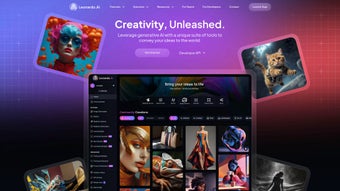

Download Leonardo AI – AI Image & Video Generator, Free Creative Suite
Overview
Leonardo AI is a cloud‑first creative platform that brings powerful artificial‑intelligence generation to both images and videos. Built for designers, marketers, developers, and hobbyists, the suite lets you type a simple prompt and instantly receive a high‑resolution illustration, a cinematic‑style still, or a fully animated clip. The service also includes a Transparent PNG Generator that removes backgrounds with a single click, making it ideal for rapid asset creation across social media, e‑commerce, and branding projects.
In addition to the core generators, Leonardo AI offers specialized modules for AI‑driven marketing graphics, auto‑layout flyer design, and print‑on‑demand artwork preparation. Developers benefit from a robust RESTful API that supports batch processing, style switching, and direct integration with CI/CD pipelines. Because all heavy inference runs on Leonardo’s secure cloud, even low‑end laptops can produce 8K‑quality images and 1080p video clips without needing a dedicated GPU.
Regular updates keep the model library fresh, and end‑to‑end encryption guarantees that your creative data stays private. Whether you are building a product catalog, prototyping a game environment, or simply exploring AI art for fun, Leonardo AI delivers a unified toolbox that reduces reliance on multiple subscriptions and speeds up time‑to‑market.
Core Features & Tools
- AI Art Generator: Transform text prompts into realistic photos, stylized illustrations, or anime‑style artwork with customizable resolution up to 8K.
- AI Video Generator: Convert single frames or image sequences into short looping videos (up to 1080p) with adjustable frame rates and motion effects.
- Transparent PNG Generator: Automatic background removal that outputs clean PNGs ready for design systems.
- Marketing Suite: Pre‑built templates for social posts, banner ads, and email graphics that adapt to your brand palette.
- Graphic Design Module: AI‑guided layout for flyers, posters, and UI mockups, reducing manual alignment work.
- Print‑on‑Demand Integration: DPI‑aware export for merchandise, apparel, and large‑format prints.
- Developer API: JSON‑based endpoints for image/video generation, batch jobs, and style selection; includes SDKs for Python, JavaScript, and cURL.
- Collaboration Workspace: Team folders, version history, and comment threads keep projects organized across multiple users.
- Secure Cloud Storage: End‑to‑end AES‑256 encryption, GDPR compliance, and optional two‑factor authentication.
- Model Library: Curated models for Realistic, Cinematic, Anime, and Photographic styles, continuously refined by community feedback.
The breadth of these tools means you can replace a Photoshop subscription, a separate video‑animation app, and a background‑removal service with a single login. For example, a marketer can generate a banner, animate a product showcase, and instantly export a transparent logo without ever leaving the Leonardo dashboard. Developers can script thousands of product images for an online catalog, letting the API handle queueing and delivery while the cloud handles the heavy lifting. This seamless blend of creative freedom and automation makes Leonardo AI a compelling choice for both solo creators and enterprise teams looking to scale visual production without exploding costs.
Installation, Usage & Compatibility
Leonardo AI is designed for frictionless access. The primary interface runs entirely in the browser, so there is no heavyweight client to install. To start, visit Leonardo AI’s homepage, click “Sign Up – Free,” verify your email, and you’re taken straight to the dashboard where all generators are ready. For users who prefer a desktop feel, optional Electron‑based wrappers are available for Windows, macOS, and Linux; they provide offline caching of recent projects and drag‑and‑drop file handling.
System Requirements:
- Web version: Any modern browser (Chrome, Edge, Firefox, Safari) with WebGL and WebAssembly support.
- Windows wrapper: Windows 10 (1809) or later, 64‑bit.
- macOS wrapper: macOS 11 (Big Sur) or later, Intel or Apple Silicon.
- Linux wrapper: glibc 2.28+, kernel 5.4+, optional Vulkan GPU drivers for accelerated previews.
While inference runs on Leonardo’s cloud, the desktop client can leverage local GPU resources for faster preview rendering. Teams requiring on‑premise control can request a private‑cloud deployment, complete with Docker images and Kubernetes manifests, allowing the inference engine to run behind a corporate firewall.
The workflow is simple: select a generator, type or paste your prompt, choose a style model, set the resolution, and click “Generate.” The platform queues the request and shows a live progress bar. Finished assets appear in the “My Assets” gallery where you can download, share a public link, or push directly to Google Drive, Dropbox, or Amazon S3. For developers, a POST request to https://api.leonardo.ai/v1/generate with your API key returns a URL to the generated file once processing completes. Comprehensive documentation, code samples, and a sandbox environment make integration straightforward for both novices and seasoned engineers.
Pros, Cons, Frequently Asked Questions & Final Thoughts
Pros
- All‑in‑one platform eliminates the need for multiple design, video, and background‑removal tools.
- Extensive style library (Realistic, Cinematic, Anime, Photographic) provides creative flexibility.
- Cloud rendering delivers fast results on low‑end hardware.
- Transparent PNG generation saves countless hours of manual masking.
- Robust API enables batch processing and automation for large‑scale projects.
- Collaboration workspace with version control streamlines team workflows.
- End‑to‑end encryption and GDPR compliance protect user data.
- Free tier available for individuals, with scalable pricing for enterprises.
Cons
- High‑resolution video rendering can experience slower queue times during peak usage.
- Advanced style tweaking may require a brief learning curve for non‑technical users.
- Desktop wrappers are optional; offline capabilities are limited to cached projects.
- Custom model training is currently restricted to enterprise plans.
- API usage costs can accumulate for massive batch jobs without volume discounts.
Frequently Asked Questions
Is Leonardo AI free to use?
Yes. A free tier provides a limited number of image and video generations each month, perfect for hobby projects. Paid plans unlock higher resolutions, priority rendering, and larger API quotas.
Can I use the assets commercially?
Assets generated under a paid subscription come with a commercial‑use license, allowing you to incorporate them into marketing campaigns, product packaging, or any revenue‑generating material.
What file formats are supported?
Images export as PNG, JPEG, or WebP; transparent assets are automatically saved as PNG. Videos are available in MP4 (H.264) and GIF, with resolution options up to 1080p.
How secure is my data?
Leonardo AI uses TLS 1.3 for data in transit and AES‑256 encryption at rest. All storage resides in GDPR‑compliant data centers, and two‑factor authentication is available for added protection.
Can I integrate Leonardo AI with existing design tools?
Absolutely. Plugins exist for Adobe Photoshop, Figma, and Sketch, letting you generate AI assets directly within those environments. The API also supports webhook callbacks for seamless CI/CD or CMS integration.
Conclusion & Call to Action
Leonardo AI stands out as a versatile, cloud‑native creative suite that merges cutting‑edge AI generation with practical workflow tools. Whether you’re a solo freelancer seeking rapid prototyping, a marketing team needing fresh visuals on a tight deadline, or a developer building an automated content pipeline, Leonardo AI delivers speed, quality, and security—all backed by a generous free tier. Ready to supercharge your visual production? Download Leonardo AI today and start creating stunning images and videos in minutes.
Overall Rating: 4.5/5 – Leonardo AI offers a powerful, unified creative experience that’s especially valuable for teams needing fast, high‑quality visual content.



.png)



